Etsy Listing Optimization: A Step-by-Step 2026 Guide
A practical guide to Etsy listing optimization: fix your title, tags, photos, and description so your listings actually get found.
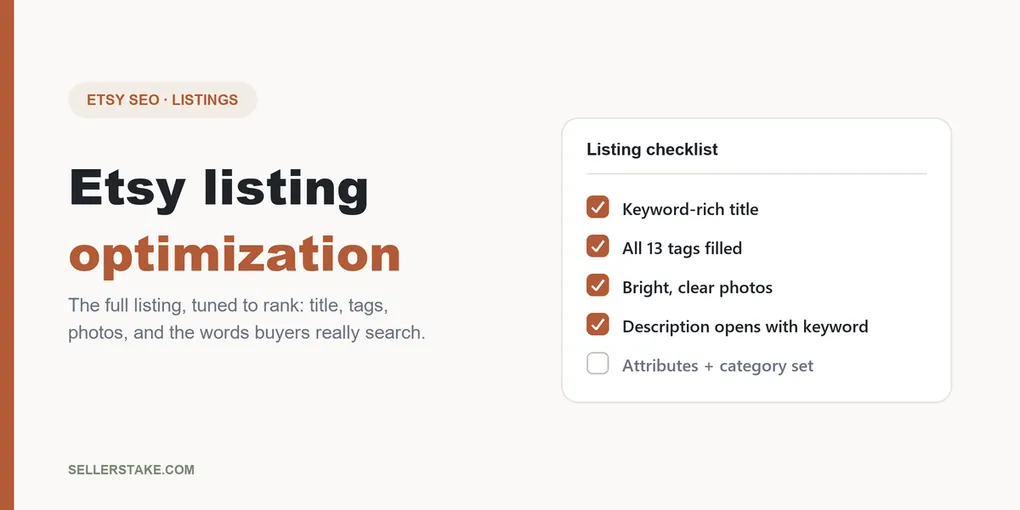
Etsy listing optimization means shaping every part of a listing, the title, the 13 tags, the photos, and the description, so Etsy shows it to the right buyers and those buyers click. Do it well and a single product can go from invisible to a steady trickle of sales. This guide walks you through it in order, and it works for any Etsy shop: printables, jewelry, stickers, candles, or print-on-demand.
I will keep it plain. No theory you cannot use. By the end you will know exactly what to change on one listing today, and why each change matters.
Some links below are affiliate links, which means I may earn a small commission at no extra cost to you. It never changes what I recommend.
What Etsy listing optimization actually means
A listing is not one thing. It is a stack of signals, and Etsy reads each one to decide two questions: does this match what the buyer searched, and will this buyer actually buy it. Optimization is just making every signal answer yes.
The signals split into two groups. Search signals decide whether you show up at all: your title, your tags, your attributes, and the first line of your description. Conversion signals decide whether people buy once they see you: your photos, your price, your reviews, and how complete your shop looks. Etsy watches your click and sale rates, so a listing that gets clicks and sales gets shown to even more people. Ignore either group and you leave money on the table.
Here is the order I work in, because it matches how buyers find you: keywords first, then title, then tags, then photos, then the description and the details most sellers skip.
Start with the words buyers actually type
You cannot optimize a listing until you know the exact phrases buyers use, and you cannot guess those from your own head. You have to look them up.
I use the free plan of eRank for this. You type a phrase and it shows you the monthly search volume and how many listings compete for it. That one screen kills a lot of bad decisions. When I searched “planner,” eRank showed about 25,948 US searches a month, which looks tempting until you see the competition.
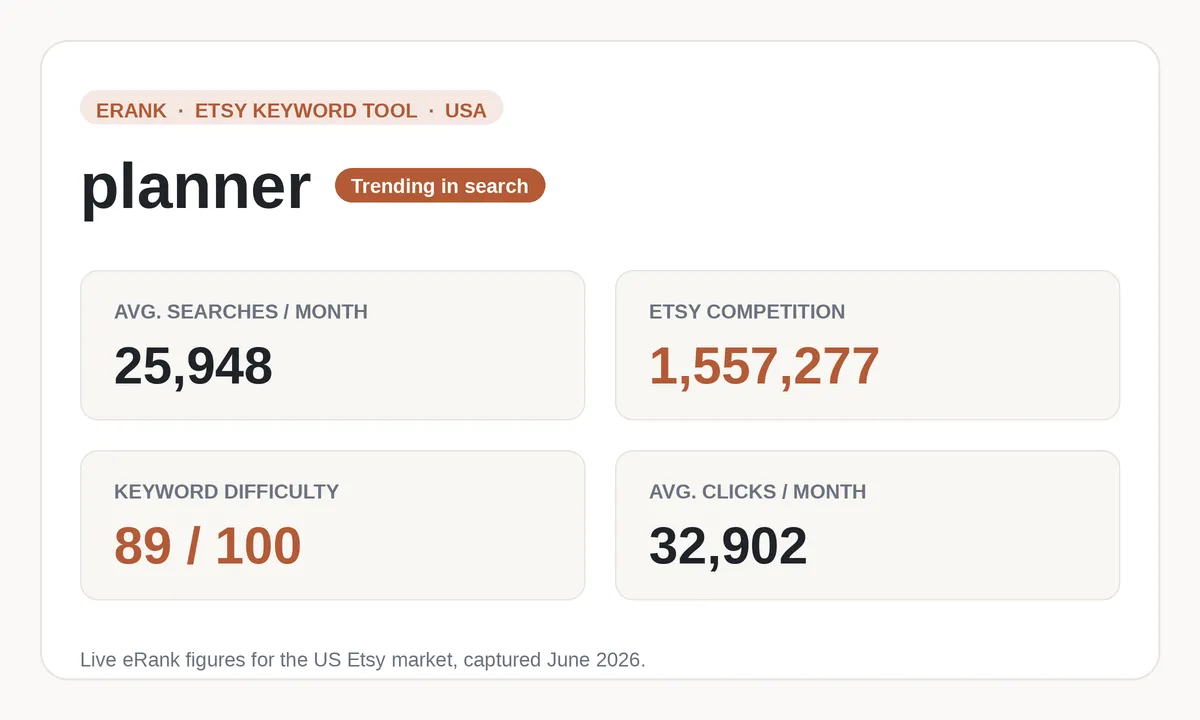
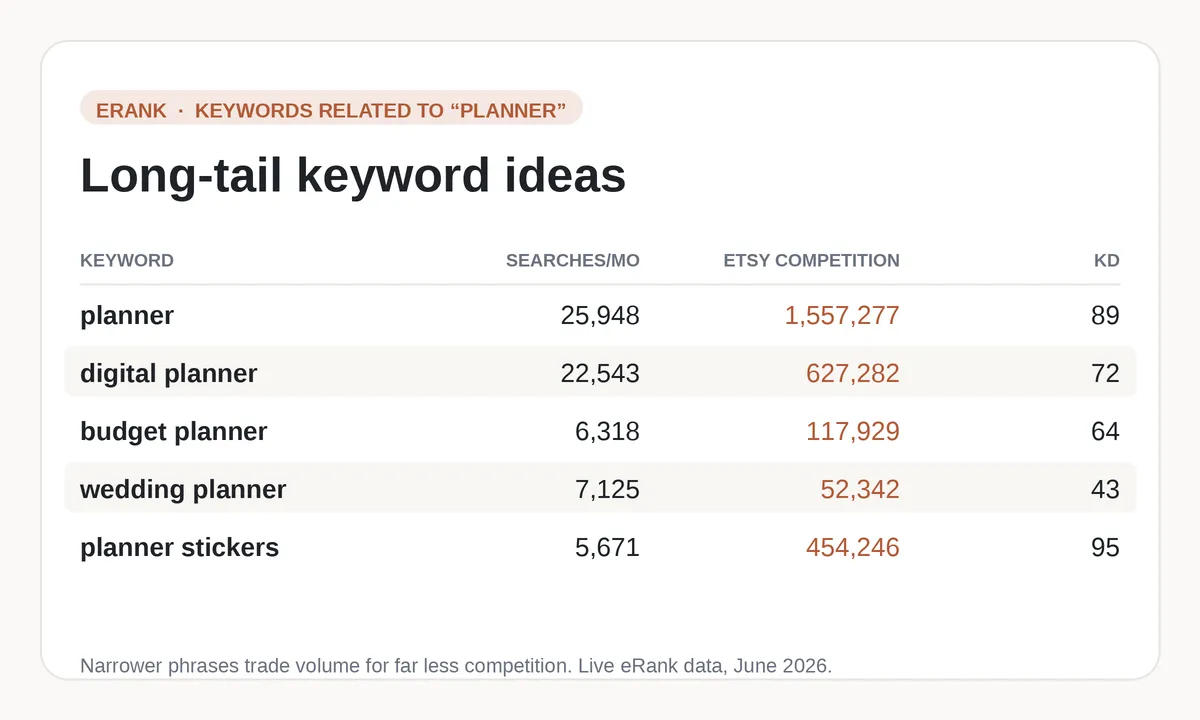
That broad term sits against 1,557,277 competing listings. A new shop lands on page 40 where nobody looks. The move that works is the long-tail keyword: a longer, more specific phrase with fewer searches but far less competition. “Budget planner printable” gets 343 searches a month against just 55,247 listings. Fewer people, but a real chance they actually find you.
The free plan gives you 5 keyword lookups a day, no credit card, and it does not expire, which is plenty to research one listing at a time. For the click-by-click version I wrote a full guide to using eRank for Etsy keywords, and if you want to weigh it against other options first, here are the best Etsy SEO tools compared.
Find your keywords with eRank free
Write down five or six long-tail phrases that describe your product closely. Those become the raw material for everything that follows.
Write a title that ranks and reads well
Your title is the heaviest search signal you control, so it does the most work. Two rules cover most of it.
First, put your strongest keyword near the front. Etsy gives early words a little more weight, and so do buyers skimming a page of results. Second, write it for a human as well as the algorithm. A title crammed with repeated words looks like spam and people scroll straight past.
So instead of “Planner Printable Digital Download Instant PDF Planner Planner,” write “Budget Planner Printable, Monthly Finance Tracker, Instant Download PDF.” It reads naturally and it carries three real search phrases. Use the front for your main keyword and the rest for close variants, separated by commas.
Fill all 13 tags, and do not waste one
Etsy gives you 13 tags per listing, each up to 20 characters. Every empty tag is a search you have chosen not to show up for, so fill all 13, every time.
A few rules do most of the work:
- Use multi-word phrases, not single words. “Habit tracker printable” beats “tracker,” because almost nobody searches one bare word and single words are the most competitive.
- Do not just repeat your title. Your title already covers its phrases, so use tags to widen the net with different wordings and related searches.
- Think about the buyer’s situation, not only the product. People search by occasion too: “new year planner,” “student budget sheet,” “teacher gift printable.”
Pair eRank with a free trick: type your phrase into Etsy’s own search bar and read the autocomplete suggestions. Those are real searches other buyers make. For a full worked example with 13 filled-in tags, see my guide to using all 13 Etsy tags.
Photos carry the sale
Keywords get you seen. Photos decide whether the click turns into a sale, and that sale rate feeds straight back into your ranking. This is the conversion side of optimization, and it is where a lot of otherwise well-optimized listings quietly leak money.
Use all ten photo slots. Lead with a bright, clean main image that reads clearly as a thumbnail, because most buyers see you first as a small square on a crowded page. Then show the product in use, show scale, and for printables show a realistic mockup of the finished piece on a wall, a desk, or a phone. If your photos need work, these are the design tools I use to make Etsy printables and their mockups.
Optimize the description and the details people skip
The description matters less for search than your title and tags, but the opening still counts. Put a clear sentence using your main keyword in the first line, because Etsy weighs that opening more than the rest. After that, write for the buyer: what they get, the file formats or dimensions, how to use it, and what to expect after purchase.
Then handle the parts most sellers forget:
- Attributes and category. Fill in every attribute and pick the most specific category Etsy offers. Buyers filter by these and the algorithm reads them as signals.
- A complete shop. An about section, real policies, and a filled-in profile all tell Etsy you are a finished shop worth trusting, and buyers feel the same.
- Price with intent. Price is a conversion signal too. Too high and clicks do not convert; too low and buyers doubt the quality. I broke down how to set it in how to price your printables.
If any of this feels new, start with the fundamentals in Etsy SEO for beginners, then come back and layer the rest on top.
Optimize, then give it time
Here is the part the “get rich on Etsy” videos skip. Optimization is not instant. After you change a listing, Etsy needs a few weeks to gather enough click and sale data to decide where you belong in search. New shops also get a small temporary visibility boost, then settle into their real position.
So do not rip your listing apart again on day three because nothing happened. Optimize it properly, once, then leave it alone and watch the stats. If a listing gets views but no sales, look at the photos and price. If it gets no views at all, the problem is almost always keywords, so revisit the title and tags. The sellers who win are the ones who keep refining while everyone else quits at week two.
Your listing optimization checklist
Run this on one listing today, then repeat it for the next:
- Research 5 to 6 long-tail keywords in eRank.
- Rewrite the title with your best phrase near the front, close variants after.
- Fill all 13 tags with different phrasings and buyer-situation searches.
- Use all ten photo slots, led by a bright, clear thumbnail.
- Open the description with a keyword sentence, then explain what the buyer gets.
- Complete every attribute, the category, and your shop profile.
- Save it, and give it a few weeks before you judge it.
That is the whole game, one listing at a time.
Start optimizing with eRank’s free plan
Frequently asked questions
How long does Etsy listing optimization take to work?
Give it a few weeks. After you change a listing, Etsy needs time to collect enough click and sale data to reposition it in search, and new listings often see a small temporary boost before they settle. Optimize once, then judge it after two to four weeks rather than after a few days.
What is the most important part of an Etsy listing to optimize?
Your keywords, because they decide whether you show up at all. The best title in the world cannot rank for a phrase no one searches. Research real long-tail phrases first, then build your title and tags around them.
Do I need paid tools to optimize my Etsy listings?
No. eRank’s free plan gives you 5 keyword lookups a day at no cost, and Etsy’s own search-bar autocomplete is free keyword research. Paid plans add convenience and volume, but you can optimize a shop properly without spending anything. See my honest eRank review if you are weighing the upgrade, or this roundup of the best free Etsy keyword tools.
How often should I update my Etsy listings?
Only when the data tells you to. If a listing gets views but no sales, adjust the photos or price. If it gets no views, revisit the keywords. Constantly rewriting a listing that is doing fine just resets the clock Etsy needs to rank it.
Does optimizing one listing help my whole shop?
Indirectly, yes. Every listing that earns clicks and sales strengthens your shop’s overall track record with Etsy, which can lift your other listings too. That is why it pays to optimize them one at a time rather than half-doing all of them at once.
Some links in this article are affiliate links. See our Affiliate Disclosure.
← Back to all articles