The Best Design Tools for Etsy Printables in 2026
We tested the most popular design apps for making printables, planners, and templates. Here are the tools that actually earn their place in your shop.
Selling printables, planners, and templates on Etsy lives or dies by your design workflow. The right tool lets you ship more listings, keep a consistent brand, and update files in minutes. The wrong one buries you in fiddly menus.
We spent a month making real listings in each of the most-recommended apps. This guide covers what worked, what didn’t, and which tool we’d put our own money behind.
What we looked for
- Speed — how quickly you can go from blank canvas to upload-ready PDF
- Templates — a strong starting library so you’re not designing from zero
- Export quality — crisp, print-ready files at the right dimensions
- Price — value for a side-hustle budget
Our rule: a tool has to pay for itself within the first handful of sales, or it doesn’t make the list.
Our top pick: Canva Pro
For most sellers, Canva Pro is the fastest path to professional printables. The template library is huge, the editor is genuinely beginner-friendly, and the “Resize” feature lets you spin one design into multiple product sizes instantly.
Here’s how the three tools we tested stack up at a glance:
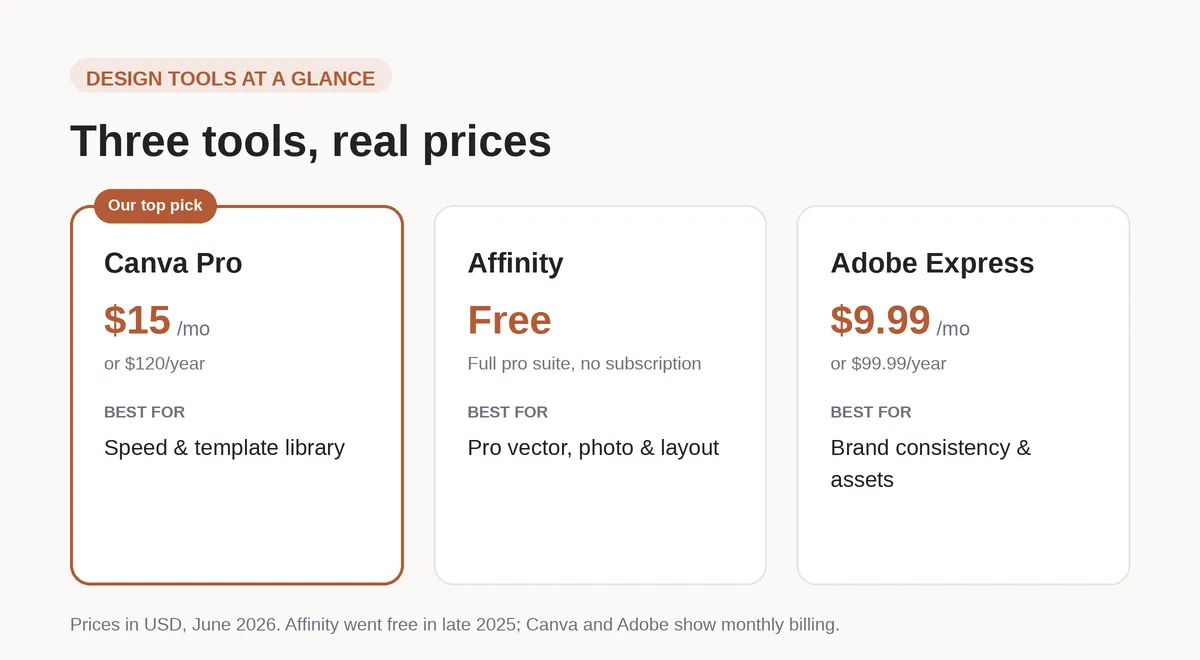
Canva Pro takes our top spot for speed, but the right pick really depends on your budget and how much fine control you want. More on each below.
If you want to try it, the Pro plan has a free trial:
Try Canva Pro free
Quick comparison
| Tool | Best for | Price (USD, Jun 2026) |
|---|---|---|
| Canva Pro | Speed & templates | $15/mo (or $120/yr) |
| Affinity | Full pro suite, free | Free |
| Adobe Express | Brand consistency | $9.99/mo (or $99.99/yr) |
The bottom line
If you’re just starting out, Canva Pro gives you the most listings per hour of effort. As your shop grows and you want pixel-perfect control, it’s worth adding a dedicated vector tool like Affinity, which went completely free in late 2025, to the mix.
Great design gets the click, but buyers have to find your listing first. That part comes down to Etsy SEO, and once they land, the price you set decides whether they buy.
See current Canva pricing
Some links in this article are affiliate links. See our Affiliate Disclosure.
← Back to all articles